



What Is Google Workspace Web Hosting?
When people search for Google Workspace web hosting, they think they’ll be able to publish sites directly through Google. It’s a bit different in reality. Unlike traditional web hosting companies that rent server space to store website files, Google Workspace doesn’t rent server space. It’s a collection of online business tools that run through Google’s cloud. The tools include Gmail for professional email, Google Drive for file storage, Google Docs for document creation, Google Meet for video meetings, and Google Calendar for scheduling. It feels like a hosting solution because Google Workspace connects closely with domains and online businesses. You can buy a domain from a registrar, connect it to Google Workspace, and then use that domain for email. Instead of using a general email address, a business owner can use something like thenewshant@company.com, which looks more professional. Website hosting still needs to be done by a separate provider unless the website is built using another Google service.
Rather than just storing websites, Google Workspace focuses on business operations. Your website tells people who you are, but your daily business activities require communication, teamwork, and information management. With Google Workspace, employees can share files, edit documents together, schedule meetings, and communicate securely. It’s designed to be accessible, so users can work from laptops, tablets, and smartphones without being tied to one place. The growth of remote work and online businesses has made this flexibility extremely valuable. Businesses can use a cloud solution instead of installing expensive software or maintaining complicated servers. Instead of managing technical systems, companies can focus on customers.
The Difference Between Google Workspace and Traditional Web Hosting
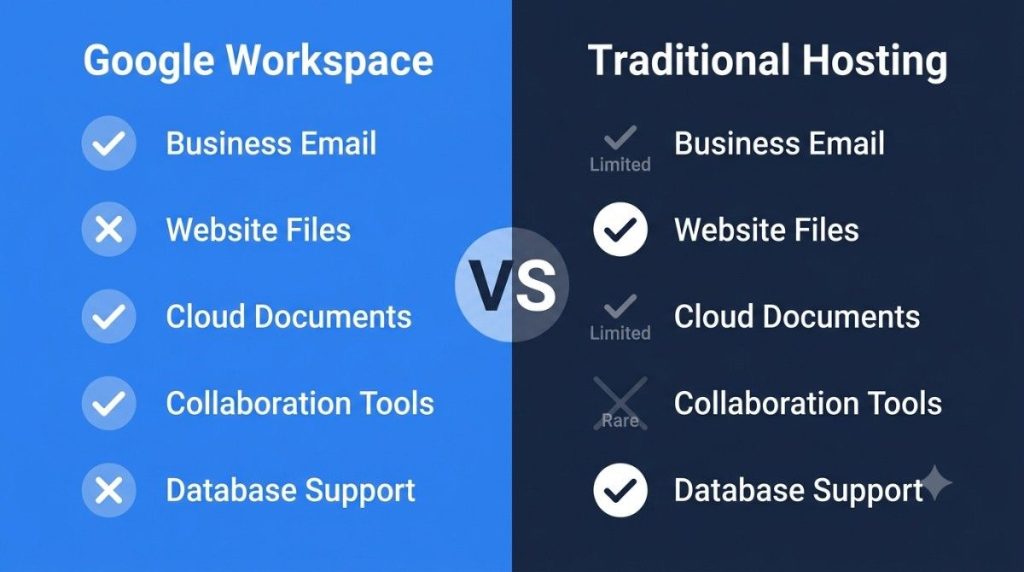
Although both are important for an online business, traditional web hosting and Google Workspace serve different purposes. Web hosting lets you store files, images, databases, and applications on a server. If someone types your website address into a browser, the hosting server delivers those files. Having a website online isn’t possible without web hosting. Most hosting providers offer features like website builders, database management, SSL certificates, backups, and server resources.
The Google Workspace, however, focuses on communication and productivity. It normally doesn’t store your website’s core files or let you access it through a browser. Your business email, documents, shared drives, and online collaboration are all managed by it. It’s like comparing a physical store and an office management system. Customers need a place to visit, but your office system helps employees stay organized. They’re both important, but they solve different problems.
It’s common for businesses to use both services at the same time. Their website is hosted with a web hosting company, and they use Google Workspace for email and internal operations. Combining these two creates a digital ecosystem. Google Workspace helps the company communicate professionally and manage tasks efficiently. Businesses shouldn’t choose a solution that doesn’t match their actual needs if they understand this difference.
How Google Workspace Supports Modern Businesses
Speed, collaboration, and reliability are key to modern businesses. Companies may have employees working from different cities or countries, so traditional office systems aren’t practical. Teams can work together in real time with Google Workspace. The same document can be edited by multiple people, comments can be made, meetings can be scheduled, and important information can be shared.
Having all Google Workspace apps connected is a big plus. You can add a Google Meet link to a calendar event. Documents can be stored in Google Drive and shared instantly. Files stored in the cloud can be included in emails. The connected experience reduces unnecessary steps and makes you more productive. Teams can manage multiple tasks from one platform instead of switching between unrelated programs.
Google Workspace is also secure. With account controls, authentication options, spam filtering, and data protection tools, the platform protects business information. While no online service can guarantee perfect security, major tech companies invest heavily in protecting their infrastructure. Small businesses without IT teams can use these tools without having to learn advanced tech.
How Google Workspace Works With Your Website and Domain
One of the most important parts of an online identity is a domain name. It represents the brand and helps customers recognize it. Businesses can connect their existing domain to Google Workspace and create customized email accounts. Keeping a consistent brand image across the company’s website and communication channels is important.
In most cases, setting up a domain involves verifying ownership and updating DNS records. DNS settings tell internet systems where different services should go. Messages sent to a business’s domain are handled by Google’s mail servers. A professional business address can be added to Gmail once it’s configured.
Customers get a better experience with this integration. Customers trust a business more when they get emails from a branded address. Having a professional email system may seem like a small thing, but it can influence how people view your company.
Key Features of Google Workspace for Businesses
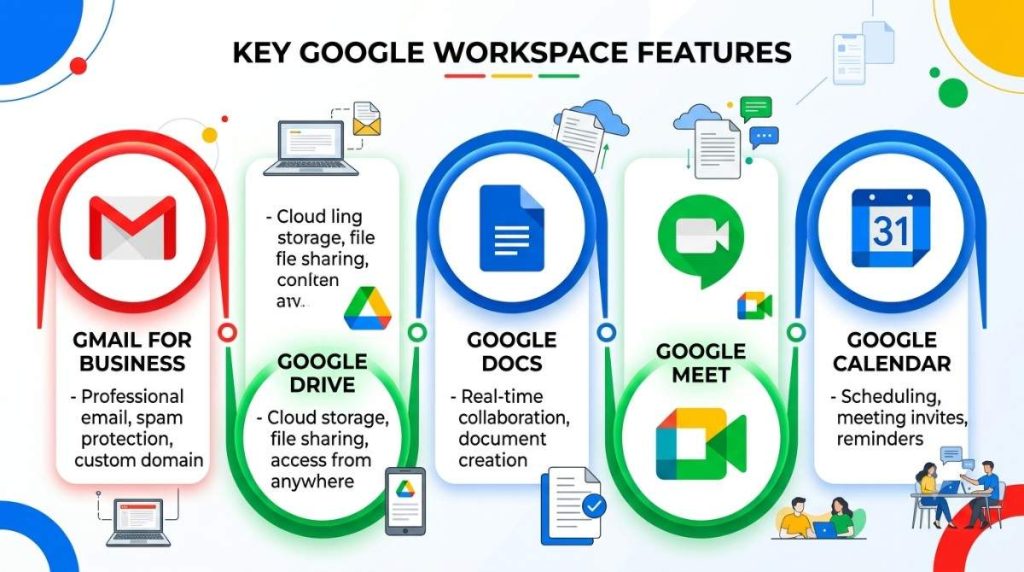
Organizations of all sizes will find Google Workspace useful. With the platform, businesses can create, communicate, and collaborate anywhere.
Gmail for Business Communication
It’s one of the most recognizable email platforms around, and the business version has more features. Google Workspace Gmail lets companies use their own domain name instead of a generic one. It creates a stronger brand presence and improves communication.
Business email includes spam protection, organization features, and integration with other Workspace apps. Email conversations can easily be converted to calendar meetings or shared documents. Connected workflows keep projects moving and reduce delays.
Google Drive and Cloud Storage Benefits
Google Drive lets businesses store documents, images, spreadsheets, presentations, and other files online. Instead of keeping everything on individual computers, teams can keep everything in one place.
Cloud storage makes collaboration easier, too. Rather than asking someone to send the latest version, team members can access updated files themselves. Duplicate documents or outdated information can’t be used to make important decisions this way.
Is Google Workspace a web hosting service?
The short answer is no, Google Workspace isn’t traditional hosting. It’s a productivity platform for businesses. It’s important to make this distinction because many beginners think they’re automatically hosting their website with Google Workspace.
A website needs a hosting infrastructure where its content is stored and delivered. HTML files, images, databases, applications, and other technical stuff. We don’t primarily provide these services through Google Workspace.
Users can create simple websites and online pages with Google’s other tools. You don’t need to confuse these tools with full web hosting services like Google Workspace.
When Do You Need Separate Web Hosting?
Dedicated web hosting is a good idea if your business website has advanced features like online stores, customer accounts, booking systems, or membership areas. They maintain website environments, speed up websites, and support web technologies.
Good business setups include:
- Domains
- Google Workspace for professional email
- Hosting from a hosting company
- Tools like SSL protect your data
- Keeping your data safe and secure
The parts work together to make a complete online presence.
Benefits of Google Workspace with Web Hosting
Using Google Workspace with web hosting gives businesses a strong digital foundation. With Google Workspace, you can manage internal operations and communication through your website.
There are several benefits to this combination:
- Email addresses that look professional
- Collaborate better
- Management of files is easier
- Communication is better
- You can access it anywhere
- IT systems don’t have to be as complicated
Having this setup allows businesses to be flexible and professional at the same time.
Google Workspace Pricing and Plans Overview
There are different subscription levels for Google Workspace based on your business needs. You can choose from a variety of plans based on storage limits, administrative controls, security features, and advanced business tools.
Small teams may just need the basics, whereas large organizations may need more storage, better management, and more security. Your company’s size, number of users, and workflow will determine which plan is right for you.
Businesses should think about how much storage they need, how many employees will use it, and if they need advanced admin features before choosing a plan.
How To Set Up Google Workspace On Your Domain
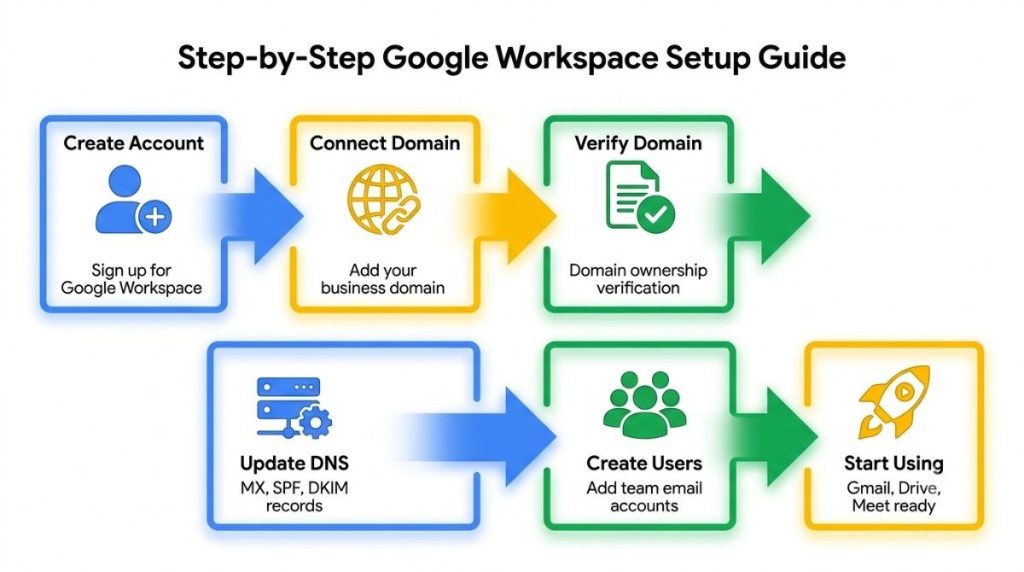
In most cases, setting up Google Workspace is easy, but you have to pay attention when configuring it.
Step-by-Step Setup Process
Basically, it’s like this:
- Sign up for Google Workspace.
- Your domain is already connected.
- Make sure the domain is yours.
- You need to update your DNS settings.
- Set up user email accounts.
- Set up security preferences.
- Workspace tools are great.
Employees can start using Gmail, Drive, Meet, and more once the setup is done.
Security and Reliability of Google Workspace
Every online business is concerned about security. Users’ data is protected and service availability is maintained using cloud-based systems. Users can also control access, apply security policies, and manage accounts through administrative settings.
Another benefit is reliable access. Since cloud-based services don’t require a single office computer or physical server, employees can work anywhere. As a result, downtime risks are reduced and flexible working environments are supported.
Google Workspace vs Other Business Hosting Solutions
Compared to other solutions, Google Workspace has the biggest difference in purpose. There are some platforms that focus on hosting websites, and others that focus on business productivity.
| Feature | Google Workspace | Traditional Web Hosting |
|---|---|---|
| Business Email | Yes | Usually limited |
| Website Files | No | Yes |
| Cloud Documents | Yes | Limited |
| Collaboration Tools | Yes | Rare |
| Database Support | No | Often, yes. |
What’s best for your business depends on what you need.
Using both is good for a lot of companies.
Common Mistakes to Avoid When Using Google Workspace
Most people think Google Workspace replaces all online business tools. Communication and productivity are great, but it’s not a replacement for everything.
It’s also a mistake to ignore security settings. Protect your business’s data with strong passwords, security controls, and proper user management.
The Future of Google Workspace and Cloud Services
The cloud keeps changing how businesses work. There’s a trend for companies to move away from traditional systems and use flexible online platforms instead. Introducing Google Workspace, a connected tool that combines essential business tools.
With artificial intelligence, automation, and cloud collaboration improving, platforms like Google Workspace will become even more important. Digital is the future of work, and businesses can adapt faster when they use the right tools.
Conclusion
Google Workspace web hosting is a confusing term, but understanding the difference between productivity tools and website hosting makes everything clearer. It’s not a replacement for traditional web hosting; instead, it’s a powerful business platform that helps organizations communicate, collaborate, and manage information. Combined with reliable web hosting, it gives businesses of all sizes a complete online solution.
Google Workspace makes your team run smoothly behind the scenes, while a professional website helps customers find your brand. They’re the foundation for modern digital success. A good combination of tools can boost your productivity and make you look more professional, whether you’re a startup or a freelancer.
FAQs about Google Workspace Web Hosting
1. Can Google Workspace host my website?
Google Workspace is mostly for email, storage, communication, and collaboration. Most websites need a separate web host.
2. Can I use my own domain with Google Workspace?
Your business name can be used to create professional email addresses.
3. Is Google Workspace suitable for small businesses?
Small businesses love Google Workspace because it provides professional tools without requiring complex IT.
4. Do I need web hosting if I only use Google Workspace?
Web hosting isn’t necessary if you don’t have a website. A hosting provider is usually required if you want a business website.
5. Is Google Workspace secure for business data?
There are security features in Google Workspace to protect business accounts and information, but businesses should still be careful.